Commands
NinjaTrader's ATI (Automated Trading Interface) methods and commands offer robust capabilities for advanced trading automation. You can interact with the platform programmatically using specific commands to manage orders, positions, and much more, directly through the interface. This functionality is especially useful for those who want to integrate NinjaTrader with external systems or develop custom automated trading strategies.
Available Parameters and Valid Values
To utilize these methods, you'll be working with various commands such as Place, Cancel and Change orders, each accepting specific parameters that define their action.
For example, when placing an order, you can specify the instrument, order type, price, quantity, and other trade characteristics. This level of detail provides fine-grained control over trading activities, enabling precise execution based on your trading criteria.
The following chart outlines valid values for each of the parameter types required by CrossTrade commands.
| Parameters | Values |
|---|---|
| COMMAND | CANCEL, CANCELALLORDERS, CHANGE, CLOSEPOSITION, CLOSESTRATEGY, FLATTENEVERYTHING, PLACE, REVERSEPOSITION, FLATTEN, FLATPLACE, CANCELORDERS, CANCELREPLACE |
| ACCOUNT | The name of the account the command is to be processed (This will reflect the Account's Name property as opposed to the Display Name property.) |
| INSTRUMENT | Instrument name (e.g., ES1!, ES 09-25, ES SEP25, ESU5) |
| ACTION | Buy, Sell |
| QTY | Any integer value |
| ORDER TYPE | Market, Limit, Stopmarket, or Stoplimit |
| LIMIT PRICE | Any decimal value (use decimals not commas, e.g., 1212.25) |
| STOP PRICE | Any decimal value |
| TIF | Day or GTC |
| OCO ID | Any string value |
| ORDER ID | Any string value (must be unique) |
| STRATEGY | Strategy template name (must exist in NinjaTrader) |
| STRATEGY ID | Any string value (must be unique) |
In general, when specifying parameters in a webhook alert message an underscore takes the place of any space between words, e.g., order_type, stop_price, oco_id, etc.
Using Different Order Types
- Market: A simple command to place a Buy or Sell market order. It executes immediately at the current market price.
- Limit: To buy or sell at a specified price. If the price is above or below the current market, the order may execute immediately.
- Stop: This command triggers a market or limit order when a specified stop price is reached. The stop_price parameter is crucial here.
Available Commands
When crafting payloads to send to NinjaTrader its important to understand that certain values are required depending on the command. For example, to CLOSEPOSITION you only need to supply the Account and Instrument information. Whereas, for a PLACE command, you must supply Account, Instrument, Actions, Qty, OrderType and TIF information.
The following table displays required (R) and optional (O) values for each different command value.
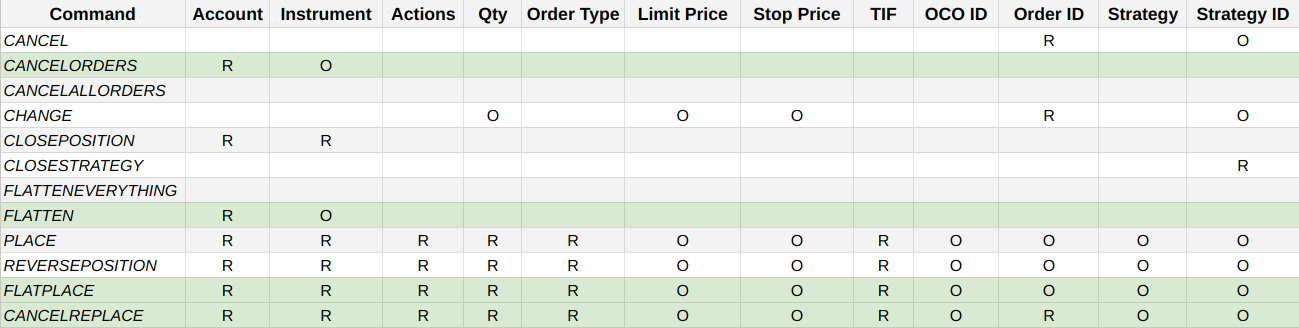
Green commands are only available using the CrossTrade NT8 Add-On.
Command Descriptions
In the message field you will supply the payload information you want to send to CrossTrade for relay to NinjaTrader. You can customize this however you want based on the methods NinjaTrader will accept and the custom modifications CrossTrade has built.
Continue reading to learn more about creating webhook alert payloads. Each command subsection has descriptions and example message payloads. There is also some very useful information for common use cases in the Examples & Use Cases section.